OFFER BUILDER — OPTIONAL UPGRADE

YOUR PRODUCT PLAN IS READY. NOW BUILD IT.

You’ve already decided who your product is for, what problem it solves, what goes inside it, and how it should be structured.

Offer Builder helps you turn that approved plan into the actual product — one section and asset at a time.

  • No starting over.
  • No rebuilding your product inside ChatGPT.
  • No trying to remember what was already decided.
YES — HELP ME BUILD MY PRODUCT
One-time upgrade. Continue directly from your finished Offer Architect plan.
Offer Builder
Product Ready

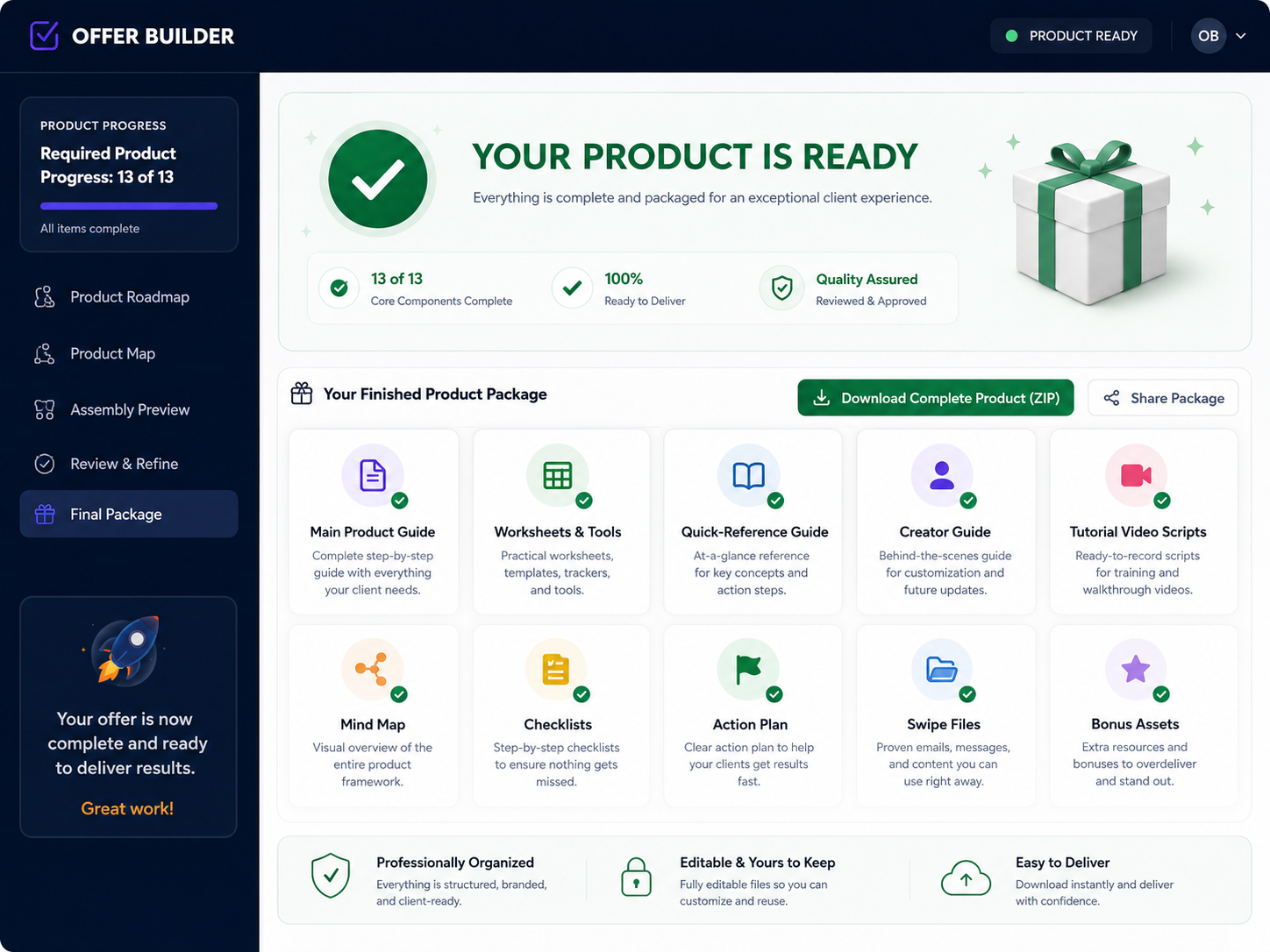
Finished Product Ready To Use

See the kind of organized deliverables your customer-facing product can include when the build is complete.

  • Main guide
  • Worksheets & tools
  • Quick-reference guide
  • Tutorial video scripts
  • Mind map
  • Production guide
Offer Builder finished product dashboard showing completed deliverables
THE PLAN ISN’T THE PRODUCT

Knowing What To Build Is A Huge Step. But You Still Have To Build It.

You already know the audience, problem, promise, format, structure, and what belongs inside the product. That gives you a blueprint — but the customer still needs the finished product.

You’ve Finished The Thinking.

Your Offer Architect blueprint gives you the decisions that normally keep creators stuck for days or weeks.

You know who the product is for.
You know the problem it solves.
You know the promise and positioning.
That gives you a blueprint. But a blueprint by itself isn’t something your customer can use.

Now The Production Work Begins.

Depending on the product you planned, you may still need to create several real customer-facing pieces.

Main guide or workbook
Individual sections and lessons
Worksheets, templates, planners, or trackers
Checklists and quick-reference materials
Practice sheets and other supporting resources
This is usually where creators end up back inside ChatGPT trying to build everything from scratch.
And that’s where the next problem starts.
The moment you start building those pieces manually in AI, the original plan can begin to drift.
BUILDING WITH AI CAN GET MESSY FAST

The More Pieces Your Product Has, The Easier It Is To Lose The Original Plan.

You ask AI to create the first section. Then the next. Then a worksheet. Then another supporting resource. At first, everything seems fine — until the product starts quietly changing as you build.

It Usually Starts Innocently.

1
Create the first sectionThe answer looks useful, so you keep going.
2
Create the next sectionThe wording shifts a little, but nothing feels serious yet.
3
Add a worksheet or supporting toolNow some ideas start overlapping with what was already written.
And suddenly your simple product is turning into something bigger, messier, or different from what you intended to build.
×
The tone shifts.

Different sections can start sounding like they were created for different products.

×
Ideas get repeated.

One section starts covering something that another section already handled.

×
Later content appears too early.

AI jumps ahead and starts taking over material that belongs somewhere else.

The Problem Isn’t That AI Can’t Create Content.
The problem is keeping every piece aligned with the product you already decided to create. That is the production gap Offer Builder is designed to solve.
INTRODUCING OFFER BUILDER

Give AI The Structure It Needs To Help You Finish The Product.

Offer Builder takes the completed plan from Offer Architect and turns it into a guided production workflow — so you build the product one approved piece at a time instead of trying to manage the entire thing inside one AI conversation.

Instead Of Giving AI One Vague Job...

You could open ChatGPT and simply say:

Typical AI instruction
“Help me make this product.”
Offer Builder approach

Build one specific section or asset at a time — using the approved product plan as the context.

Each Build Prompt Has A Clear Job.

For the current section or asset, Offer Builder prepares focused instructions that tell the AI what it needs to know — and what it should leave alone.

1
What this piece needs to accomplishThe AI is given a clear job for the current section or asset.
2
What has already been approvedEarlier approved content can be carried forward as useful context.
3
What later sections are reserved to coverThe AI is told what belongs later so it doesn’t try to do everything at once.
4
What boundaries the product needs to stay insideThe original scope, format, promise, and other approved decisions remain part of the build.
5
What should not be invented or addedThe prompt tells AI not to redesign the offer, fabricate proof, or quietly expand the product.
That means each new piece is created with the right context.

Not as a random standalone answer that you have to somehow fit back into the product afterward.

Your AI Assistant
Creates The Content
ChatGPT, Claude, or another capable AI assistant handles the actual content creation.
+
Offer Builder
Manages The Build
Keeps the structure, sequence, approved context, boundaries, and next production step organized.
You stay in control. AI creates the content. Offer Builder keeps the build moving in the right direction.
HOW IT WORKS

Build The Product In Order — Without Losing The Decisions You Already Made.

Offer Builder turns the approved blueprint into a clear production sequence, so every new piece has a defined job and every approved piece can help guide what comes next.

1
Step 1

Bring In Your Finished Offer

At the end of Offer Architect, you receive your completed Offer Builder Handoff. That file carries forward the important product decisions you already made.

Audience
Core Problem
Promise
Format
Structure
Approved Sections
Supporting Assets
Scope & Boundaries
You don’t have to explain everything again, rebuild the offer from memory, or dig through an old AI conversation to find what was finally decided.
2
Step 2

See What Needs To Be Built

Offer Builder turns the approved blueprint into a production roadmap. You can see what is already finished, what is active now, and what comes next.

Section 1 ✓
Section 2 ✓
Section 3
Section 4
Section 5
Each approved piece becomes part of the context for what comes next. Later sections can build on earlier approved work without treating every section like a completely separate product.
3
Step 3

Build One Piece At A Time

When you’re ready to create a section or asset, Offer Builder prepares the AI instruction for that specific job. You use your AI assistant to create the content, review it, and bring the approved version back into the project.

Build
Copy
Paste Into AI
Review
Approve
If the AI needs a little real-world context for the current section, it can ask focused grounding questions first — then create the finished content from your answer and the approved product context.
No giant prompt trying to create the whole product in one shot. One clear production step at a time.
BUILD IN ORDER. REVIEW BEFORE MOVING ON.

Each Piece Builds On What You Approved — Not On A Draft You Didn’t Like.

Earlier approved work can guide the next section, while later jobs stay reserved until their turn. Before anything moves forward, you get a review checkpoint.

What The AI Sees For The Current Section
Already Approved
Earlier Sections
Useful context from work you already accepted.
Current Job
Build This Piece
One clear production task at a time.
Reserved For Later
Future Sections
The AI is told what it should leave alone for now.
Then You Decide What Moves Forward
1. Review the AI result
2. Revise it if needed
3. Approve the version you want to keep
4. Continue to the next piece
Build → Review → Approve → Continue
SEE IT IN A REAL PRODUCT

Offer Builder Doesn’t Just Say “Build The Product.” It Works Through The Actual Assets.

Here’s what that looks like when a finished Offer Architect blueprint is turned into a real production workflow.

Demo Product

Strong & Steady After 50

A realistic fitness product for women over 50 who want to stay strong without exhausting workouts or extreme routines.

Main Guide
Six Weekly Calendars
Starting Point Planner
Consistency Tracker
Quick-Reference Guide
Follow-Along Workouts
Safety & Adaptation Guide

Offer Builder Doesn’t Throw All Of That Into One Prompt.

The approved blueprint already defines what belongs in the product. Offer Builder uses that structure and works through the assets individually.

Not this
“Build me a complete fitness product.”
Instead: one asset gets one clear production job. The prompt is prepared around the approved product context, the current asset, earlier approved work, and the boundaries that should stay in place.
One Product. One Approved Blueprint. One Controlled Build.
You’re not asking AI to invent the product as it goes. You’re using AI to create the specific pieces of the product you already decided to build.
SEE OFFER BUILDER IN ACTION

Watch How The Product Gets Built.

See the actual Offer Builder workflow from importing the finished blueprint through building the product assets step by step.

THE END RESULT

This Is What "Product Ready" Looks Like.

You are not stopping with scattered AI drafts. You finish with a completed product package marked ready.

Offer Builder product ready dashboard
✓ Product Ready Status
✓ Finished Assets Organized Together
✓ Ready To Download And Deliver
WHY NOT JUST KEEP USING CHATGPT?

You Absolutely Can. Offer Builder Is Designed To Work With It.

Offer Builder doesn’t replace your AI assistant. It gives your AI assistant a clearer job.

ChatGPT Is Great At Creating Content.

But a normal AI conversation is not automatically managing your entire product-production process for you.

What has already been approved?
What is the current piece supposed to accomplish?
What later sections are still reserved?

Offer Builder Adds Context + Sequence.

It deliberately gives the AI the approved context it needs for the current piece while keeping the overall product structure organized.

ChatGPT helps create the content.
Offer Builder helps manage the build.
That combination is the point.
EVERYTHING YOU GET

The Workflow That Helps You Get The Product Built.

You get the production system plus the checkpoints that help you move from approved plan to completed product.

Production Workspace

Guided Build Dashboard

A dedicated workspace for building the actual sections and assets in your product.

Approved Context

Your Planning Decisions Carried Forward

Bring the audience, problem, promise, structure, and asset plan into the build process.

Section By Section

Focused Build Prompts

Create one section or one asset at a time instead of juggling the whole product in one giant prompt.

Build In Order

Sequential Production Flow

Earlier approved work stays visible while later jobs stay reserved until it is their turn.

Control Points

Review Before The Next Stage

Review, revise, and approve each piece before it becomes part of the product context.

Progress Tracking

See What Is Finished

Keep the build organized so you always know what is done, what is active, and what is left.

CONTINUE WITH OFFER BUILDER

Your Product Plan Is Ready. Now Turn It Into The Product.

Your plan is finished. Offer Builder is the next step if you want help turning it into the actual product.

One-Time Upgrade
Get Offer Builder Today For
[OTO1 PRICE]
YES — HELP ME BUILD MY PRODUCT
One-time payment. No monthly subscription.
No thanks — I’ll build the product manually using my Offer Architect plan.
30-DAY MONEY-BACK GUARANTEE

Try Offer Builder For 30 Days.

Use Offer Builder with your product blueprint. Work through the production process. See how it fits the way you build.

Simple 30-Day Protection
If Offer Builder isn’t right for you, contact us within 30 days of purchase and request a refund according to the refund terms.
FAQ

A Few Quick Answers.

Here are the main questions buyers are likely to ask before they continue.

Do I need Offer Builder to use Offer Architect?
No. Offer Architect is complete on its own. Offer Builder is the optional next step for turning that approved plan into the actual product assets.
Does Offer Builder replace ChatGPT or Claude?
No. You still use your AI assistant to create the content. Offer Builder helps organize the build and prepares the instructions for each step.
Do I have to write the prompts myself?
No. The software prepares the build prompt for the current section or asset so you are not starting from scratch every time.
Can I review each piece before I move on?
Yes. That is one of the main advantages. You review and approve each piece before it becomes part of the product context for later stages.
What kinds of products can I use this for?
Any clearly planned digital product with practical sections and supporting assets, such as guides, workbooks, templates, checklists, planners, swipe files, and similar deliverables.
Is there a guarantee?
Yes. You are covered by the 30-day money-back guarantee shown on this page.
FINAL STEP

YOU ALREADY KNOW WHAT YOU’RE BUILDING.

NOW BUILD IT.
Your product plan is ready.
Your structure is ready.
Your assets are defined.
Offer Builder gives you a clear way to create them one by one without losing the decisions you already made.
No starting over.
No giant one-shot prompt.
No trying to manage an entire product through scattered AI conversations.
Turn The Plan Into The Product.
YES — HELP ME BUILD MY PRODUCT
Get Offer Builder for [OTO1 PRICE] — one-time payment.
No thanks — I’ll continue building manually.